Step 2: Get your 6-digit code
Open Google Authenticator → find EAL MERLIN → enter the code below
👆 Tap to open authenticator
— or —
Dashboard
EAL MERLIN
Dashboard
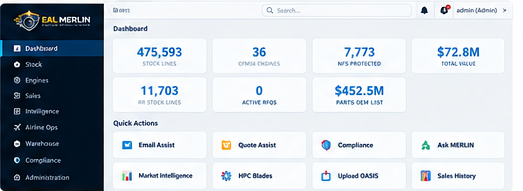
Brand imagery · AI-rendered illustrations, not current operations
...
Loading
📋 Recent Activity
Loading...
✨ What's New
💬 Feedback & Bugs
Loading...
About EAL MERLIN
EAL MERLIN is the inventory intelligence system for European Aviation Group — parts, engines, compliance and market data in one place. This page collects the brand and heritage material approved for use in the system.
Heritage Archive
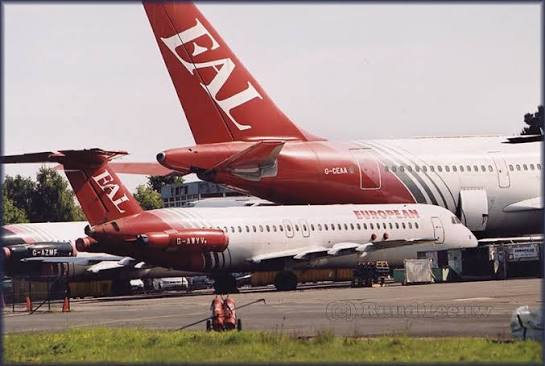
EAL fleet on the ramp — archive photographEAL aircraft — archive photographEuropean Cargo A340 — archive photograph
Image notes: archive photographs are historical and do not depict current operations. AI-rendered items are illustrations and design references, not photographs or the live interface. All images are low-resolution crops shown at or below native size; do not enlarge them for print or full-screen use.
⚠ Check before you quote: old sold prices can include transfers between EAL group companies and typed-in entries, so a very low price (for example $1 or $20) may not be a real market price. Compare it with the list price and where it came from.
Parts Search
Quoting a customer? Three stepsGot it ×
1. Type the part number above and press Search (or press Paste RFQ if the customer sent a list).
2. Click a part number to see stock, batches and what it last sold for.
3. Press Start a quote in that window. We fill the quote in for you, you check the price and save.
Part Number
Description
Aircraft
Qty
Condition
Warehouse
BIN
Keyword
Batch cost (USD)
CFM/OEM List ⓘ
Flags
Search for parts above
🔧 RR Stock Matches
Part Number
Description
Aircraft
Type
Condition
Qty
Bin
Warehouse
Price
Engine Inventory
Loading engines...
Teardown Register
EIPC Catalogue
Cross-Engine Part Commonality
vs
Engine
Ch
Sec
Figure / Title
Item
Part Number
Nomenclature
EAL stock
Also on
Eff
Qty
Search the EIPC catalogue above
⚠ Check before you quote: old sold prices can include transfers between EAL group companies and typed-in entries, so a very low price (for example $1 or $20) may not be a real market price. Compare it with the list price and where it came from.
Ask MERLIN
Results will appear here...
⚠ Check before you quote: old sold prices can include transfers between EAL group companies and typed-in entries, so a very low price (for example $1 or $20) may not be a real market price. Compare it with the list price and where it came from.
Track every part that is out of the building: repairs, loans and exchanges. Red tags show what needs chasing today (overdue, quote due, open 30+ days).
✅ My Work
Your own chase list: quotes you sent with no answer, repairs and loans that need chasing, and enquiries you accepted but have not finished. Everything here is yours only.
📈 Monthly Report
Sales first, then repairs and returns. Optionally attach the OASIS Open ROs and Open POs exports to add those sections.
📊 Open RO Report
Turns the OASIS Open ROs export into the 14-column report. Nothing is saved in Merlin: the file is read, tidied and handed back.
In OASIS, export the Open ROs to Excel (.xlsx), the usual way.
Choose that file here. Merlin shows how many ROs, the total value and how many are past their promise date.
Check the preview, then press Download report.
📋 Open PO Report
Turns the OASIS Open POs export into the 20-column report. Nothing is saved in Merlin: the file is read, tidied and handed back.
In OASIS, export the Open POs to Excel (.xlsx), the usual way.
Choose that file here. Merlin shows how many PO lines, orders and suppliers, the values, and how many are past due with nothing received.
Check the preview, then press Download report.
📄 Pro Formas
Keep every pro forma here, tick it when the money lands, and note the real invoice once it is raised. MERLIN checks the OASIS sales export for the sales order, so it can tell you when a pro forma has shipped with no final invoice, and the weekly email lists pro formas still unpaid after 14 days.
⚠ Check before you quote: old sold prices can include transfers between EAL group companies and typed-in entries, so a very low price (for example $1 or $20) may not be a real market price. Compare it with the list price and where it came from.
✅ Stock Check from a Spreadsheet
Check any list against what MERLIN holds today, and ask for more: add stock, list price, sell price, last sold or last quoted columns to your own sheet, work out line totals and add up columns. Nothing is saved: the file is read and the answer handed back.
Use an Excel (.xlsx) file with a column headed Part Number. If it also has a column headed Batch, Merlin matches that batch.
Choose the file. To get more than the stock check, say what you want in the box below (for example "add list price and last sold price next to each part, multiply by my Qty column and total it"). Press Check list to see the counts and totals.
Press Download. If you asked for columns or totals you get your own sheet back with them added (TOTAL row at the bottom). The check sheets follow: In stock (warehouse, bin, batch, serial, qty), Other batches (same part numbers, for stores to spot-check), Not on shelf (no warehouse, KAC, LOS, in transit TXX, with the reason) and Not in stock. If any part has no list price in any catalogue, a No price sheet lists just those lines. Tick Clean copy before Download for a version without the notes, last sold and last quoted columns (for sending outside). Sheets print on A4 landscape, one page wide.
↩️ RMA Log
Every customer return in one list: what was returned, whether it was approved or denied, whose error it was, and what was credited. Press Open on a row to update it.
📈 Sales Hub
Your sales front page: what needs you now, what is worth your time, and the wins the team has put on the board
🔍 Part check
Loading the hub...
📥 Work an enquiry
Loading inbox...
Stock Matches 0
No matches found
Draft Reply
Nothing is sent to the customer from MERLIN yet. Press Copy Reply, check it, then paste it into your own email. Send to Quote Assist only saves the enquiry as an RFQ in your list.
⚠ Check before you quote: old sold prices can include transfers between EAL group companies and typed-in entries, so a very low price (for example $1 or $20) may not be a real market price. Compare it with the list price and where it came from.
📋 Quote Assist
RFQ Management & Quoting
✏️ Build Quote
✏️ You are changing quote . Press Save changes to keep your edits.
Outbound offer. You are offering this to the customer, there is no RFQ behind it. The same compliance check and approval rules apply. Make it a normal quote
How this works.1. Put in who the quote is for (name is needed). 2. Check each part below: the price is a suggestion from past sales, so change it if you need to. 3. Press Save Quote. It is saved as a draft: send it to the customer yourself, then press Mark as Sent so the team can see it is out.
⛔ CHECK THIS BEFORE YOU QUOTE. Compare every price with the list price. Old sold prices can be group transfers or typed-in entries. A line with a red warning under it has price history that looks unreliable, and Save Quote will ask you to confirm.
Quote Lines
Original Enquiry
⚠ Type part numbers exactly as written, no spaces. The letter O and the number 0 are different.
Part numberDescriptionConditionQtyPrice each (USD)×
Quote notes
Total: $0.00
📥 New RFQ
⚠ Type each part number exactly as written, as one block with no spaces. Letters are read as capitals. The letter O and the number 0 are different, so check them.
📊 Market Intelligence
Sales Prospecting & Outreach
AI-powered sales intelligence. Find buyers for EAL stock, source sellers for parts EAL needs, and generate professional outreach emails.
CFM56-7B Market
Historic High
IBA Sep 2025 + Ishka Q4 2025: values at or near peak. Distinct lack of availability. Lease rates above long-term trend.
OEM Parts Prices
+30% in 2yrs
Used serviceable material shortage. OEM material up ~30% since 2023. EAL stock bought at old prices now worth significantly more.
Sell Window
2025–2027
LEAP-1B fleet projected to match CFM56-7B by 2030. Peak pricing window may close as LEAP supply increases. Act now on 7B assets.
⚡ FTAI Power — CFM56 Retirement Accelerator
FTAI Aviation (NASDAQ: FTAI) launched FTAI Power in Dec 2025 — converting CFM56 engines into 25MW aeroderivative gas turbines for AI data centres. Production starting 2026, targeting 100+ units/year at $20M+ per unit.
1,000+
FTAI engine inventory
25MW
Per converted engine
100+/yr
Target production rate
$20M+
Est. price per unit
EAL implication: FTAI conversions remove engines from the aviation parts pool (bullish for near-term parts prices) but will accelerate retirements long-term, increasing parts availability 2027+. Monitor FTAI production ramp — if 100+/yr materialises, CFM56 part prices may soften from 2027–2028.
📊 Fleet Convergence Timeline
End 2027CFM56-5B and LEAP-1A fleets reach equal size (~6,500 each). First major milestone for A320 family transition.2027–2028CFM56-7B hospital shop visits projected to match core performance restoration events. Increased MRO demand, parts consumption accelerates.End 2030CFM56-7B and LEAP-1B fleets converge (~10,500 each). LEAP fully established. 737NG retirements accelerate. Parts availability increases.2030+Quick-turn shop visits projected at 60%+ of all CFM56 events. High parts consumption. Good market for serviceable used material.
⚠ Sanctions & Diversion Risk — Aviation Parts 2026
UK guidance explicitly names aviation parts as high-risk for Russia circumvention. OFAC Aug 2025: 18 Iran-linked shadow banking targets sanctioned. BIS Nov 2025: Rossiya Airlines TDO renewed. Iran and Russia routinely use UAE FZCOs, Turkish intermediaries and newly incorporated companies to procure aviation parts. Run Due Diligence on all new buyers before quoting. Flag unusual routing countries (Turkey, UAE unverified, Central Asia).
⚙️ HPC Blade Compatibility
CFM56-3 / -7B / -5C
Based on Jimmy Bureau engine planner reference chart. Check any HPC blade P/N for compatibility, sell status and EAL stock.
Can Sell — Standard
Can Sell — CFM56-5C Only
TOW Blade — DO NOT SELL
Loading chart...
🛡️ Compliance
This screen is the list of banned and sanctioned names. To check a customer, a destination, part numbers or an aircraft registration before you quote or ship, use the pre-sale check.
All four lists (UK OFSI, US OFAC SDN, US Consolidated Screening List with the BIS Entity List, EU Consolidated Sanctions List) sync by themselves at 05:30 and 13:30 UTC every day, adding new names and switching off names that have been delisted. People with Manage Compliance can press a button to run it now.
📬 Report Recipients
Add to Credit Watch / Ban List
Company
Source
ID
Reason
Domain
Action
Loading...
Search a company or individual to get an AI-powered compliance risk assessment before trading.
Recent Searches
ILS Sender Check
Paste the sender email from an ILS enquiry to check if they should be responded to or skipped.
Add to blocklist:
Recent Checks
Run a check above to see history here.
💬 Feedback & Bug Reports
Help improve MERLIN
➕ Submit Request or Bug
📋 Submitted Items
No items yet — be the first to submit!
👥 User Management
Loading...
Create New User
NFS Management
Flag a part Not For Sale
Loading...
Import History
Upload a new OASIS stock export (.xlsx or .csv). The import runs in the background and takes 5-10 minutes. Your current stock is backed up first and kept if anything goes wrong.
⚠ The import replaces the stock list. Engines are NOT affected. Use the OASIS stock export (the one with Part Number, Qty, Condition, Warehouse columns).
Upload the OASIS sales export (.txt, .csv or .xlsx). You see a preview first. Only rows MERLIN does not already hold are added, nothing is deleted, and re-uploading the same file adds nothing.
Loading...
📦 Dispatch / Pick-Pack
New Dispatch Order
📊 Stock Aging Dashboard
TOP 50 SLOW MOVERS (4yr+ stock, by value)
Part Number
Description
Condition
Warehouse
Qty
Date In
Batch cost
Line Value
⚠️ Airworthiness Directive Tracker
⚠️ Create New Airworthiness Directive
✈ Fleet Status Board
Live status of aircraft in the EAL airline operation.
✈ Add Aircraft
🧑✈️ Crew Qualifications
Licence, medical, and recency expiry tracking with automatic alerts.
🧑✈️ Add Crew Member
🏫 Auction Lot Intake
Bulk intake from AVIOSERV, Indy auctions, or any lot purchase. Each line is tagged with the lot reference for full traceability.
New Auction Lot Intake
Lot Manifest Lines
Recent Auction Lots
📱 Pick Scanner
Scan or enter a part number to confirm it has been physically picked from the bin. Works on mobile browsers — no app needed.
Scan Part Number
📦 Goods Receiving
Record incoming stock. Each GRN line creates a stock intake record and generates a printable BIN label.
New Goods Receiving Note (GRN)
Parts Received
Batch note builder
Three short steps. Your note builds as you type. Copy it into the OASIS batch note.
The RO number from the supplier invoice.
Check it matches the release document.
Six digits. Leave blank if the part is not from an engine.
The repair station on the invoice.
What the paperwork says. DUAL means EASA and CAA.
Date on the release document.
Tick for an LLP. The LLP sheet in the supplier folder has the cycles.
Whole number, from the LLP sheet.
Where it is going, such as a module or an engine.
Optional. The folder holding the history and paperwork trace. Typed by hand.
Optional. Goes on the end of the note.
Your batch note
Start typing and your note appears here.
Recent GRNs
🔁 Alt PN / PMA Cross-Reference
Map OEM part numbers to approved alternatives — PMA parts, interchangeable PNs, and superseded references. ALT badge appears on matching parts in search results.
⚠ Procurement Alerts — Low / No Stock vs Predicted Demand (next 60 days)
Click Refresh to load
🔍 PN Forecast Lookup
📈 Price Surge Alerts
Nightly scan compares last 90 days of EAL sales to 3yr baseline. Parts trading >20% above or below baseline are flagged as SURGE or DEPRESSION.
Click Refresh to load alerts
📝 Market Context Notes
Per-module market context notes shown in the FMV modal for hot section parts. Admin or PGS can update these when market conditions shift.
Click Refresh to load notes
📦 Project Stock Reservations
Stock reserved against active build projects. Sales team see a warning badge before quoting reserved parts.
Loading...
🎯 Opportunities
Loading...
🧑💼 Team Desk
Loading...
📁 Trace Vault
Loading...
🌐 Customer Portal
Loading...
💼 Accounts Desk
Where the month stands, in one place. Read only: nothing is written to OASIS or Chorus.
Credit limit lookup
Monthly exchange rates
Also useful
🚚 Carriage
Carriage charges per order. Type the line the way your sheet has it; Merlin splits it. Advisory: nothing is written to OASIS or Chorus.
Find
What is on this carrier invoice?
🔎 Pricing Research
Save prices you researched (a scan with handwritten prices, a PDF, a photo or a spreadsheet) with why you did it and where they came from, so nobody has to redo it. Merlin reads the file and proposes rows; you check and tick the right ones. Only ticked rows are saved.
Find a researched price
Uploads
🧾 Supplier Invoices
Every supplier invoice by purchase order, supplier and reference, with a check that stops one being booked twice. Advisory: nothing is written to OASIS or Chorus.
Find
📒 Day Book
Month sales by invoice date for accounts. Advisory only: nothing is written to OASIS or Chorus.
Manual invoices (not in the OASIS sales export)
Skybus LLC: OASIS number to Chorus number
🩺 Data Health
Loading...
📤 Stock Feed
Loading...
🛡 Pre-sale compliance check
Loading...
👥 Customer Database
Customer
💹 Portfolio Valuation
Loading valuation data...
💰 Margin Analytics
Select a tab to view margin data.
🚨 AOG Board
Loading...
🔎 Wants List
Loading...
🧐 Customer Screening Review
Loading...
💰 Price Catalogs
⬇ Generate Price List
Filter stock by aircraft, condition or warehouse and download as a formatted Excel price list.
⬆ Upload New Catalog
📁
Click to upload Excel (.xlsx), CSV, or PDF catalog
CFM56 and OEM PDF catalogs auto-parsed — no column mapping needed
Column Mapping
Platform Usage
Loading...
Audit Log
Loading...
⚙️ RR Stock
Rolls-Royce parts inventory & price catalogue
—
Batch Lines
—
Unique Part Nos
—
Total Qty
—
Rotables
—
Consumables
—
Priced PNs
Part Number
Description
Type
Condition
Qty
Bin
Batch
Price
Enter a search or click Search to browse stock
💾 Stock Import (XLSX / CSV)
Upload your Rolls-Royce stock export. Replaces existing stock data on each import.
Expected columns: Part Number, Part Description, Stock Group, Aircraft Type, Part Type, Batch Number, Qty, Condition, Bin, Warehouse, Goods Received Date, Approved Cert, YOLM